Response, New York. Noah Park: Check Point Patches Actively Exploited Management Server Path Traversal. Detection, Dallas. Ava Okello: Report Finds Nearly Half of Deployed Detections Need Attention Before SOCs Can Trust Them.
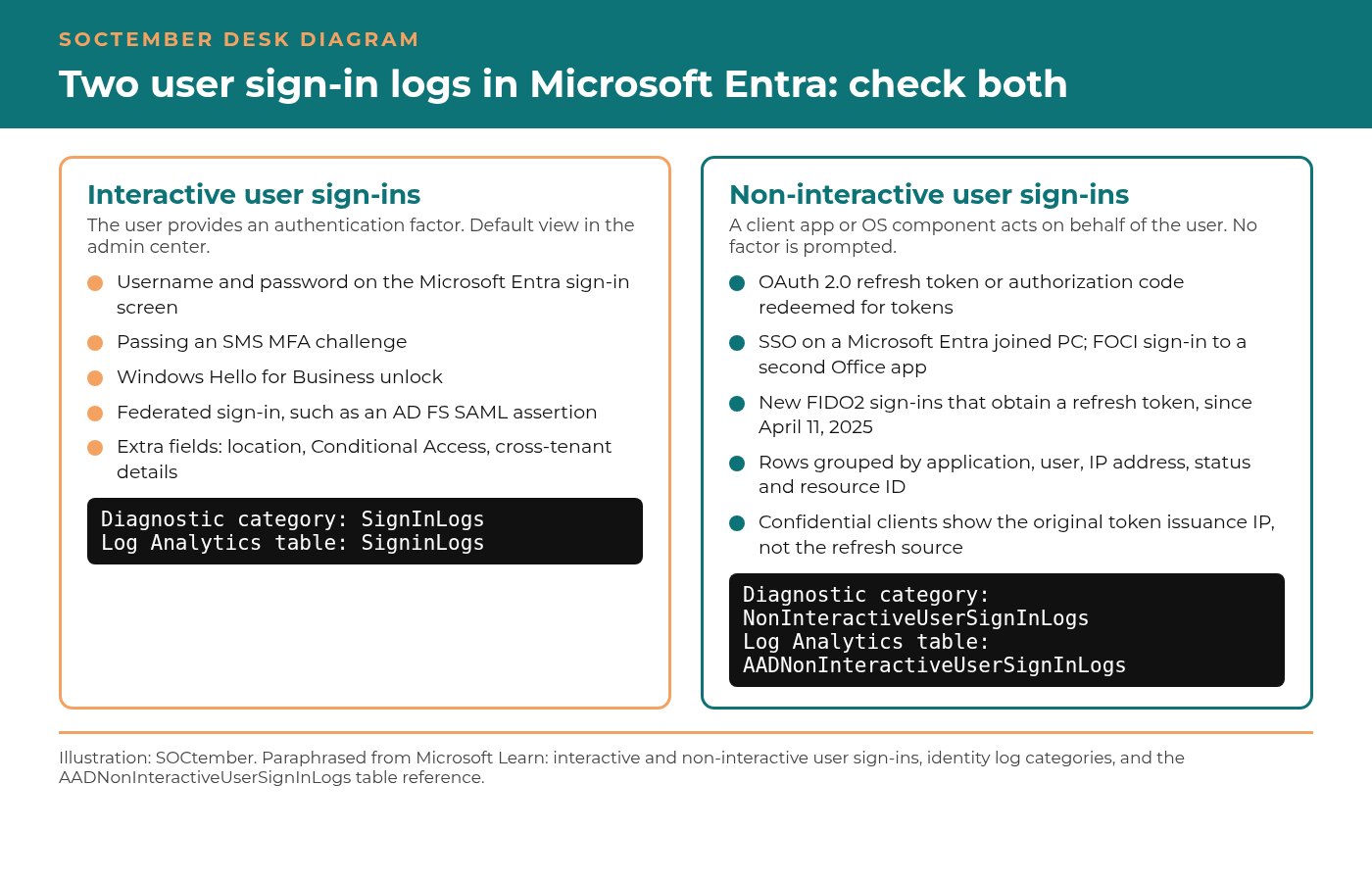
RESPONSEWordfence Says Attackers Started Hunting a WordPress Core Update Race Within Hours of the 7.1.4 Fix, Sending More Than 18,500 Requests in 21 Hours to Catch a Window That Lasts SecondsNEW YORKNoah ParkTHREAT INTELSophos Says the GOLD OGRE Ransomware Crew Had Cursor's AI Agents Work From Stolen VPN Logins to Domain Admin, Then Named Three of the Victims on Its Aur0ra Leak SiteSINGAPOREPriya ShahTOOLSRemedio Says a Single 32-Bit Multiply in TeamViewer Let a Malicious Host Run Code on the Support Technician's Machine That Connected to Help It, and Version 15.83 Fixes ItAUSTINJames WhitfordRESPONSEA Trojanized Claude Code Extension Reached Up to 5,000 Cursor Users Through Open-VSX and Planted an Attacker's SSH Key, and Uninstalling It Does Not Remove the BackdoorNEW YORKNoah ParkOPINIONMalware Image Classifiers Report 97% to 99% Accuracy, but an Audit of 10 Benchmarks Found as Much as 50.6% of Test Images Had a Copy or Near-Copy in Training, and SOC Teams Should Ask What a Model Was Graded OnLONDONElena VosDETECTIONDid You Know: PowerShell 7 Writes Script Block Logs to Its Own Event Log, Not the One Windows PowerShell UsesLONDONAva OkelloRESPONSEHudson Rock Says a DebugBear Performance-Monitoring Script on Polymarket Was Rewritten to Hijack Logged-In Trading Sessions, Sell Positions and Send Assets to an Attacker WalletNEW YORKNoah ParkTHREAT INTELPluto Security Says a Hugging Face Cryptomining Campaign Hid in 31 Fake Qwen2 Repositories That Run Code the Moment a Model Loads, and Came Back Within Days of a TakedownSINGAPOREPriya ShahDETECTIONCrowdStrike Says China-Nexus VAPOR PANDA Used the ARTEX AI Agent Framework Against More Than 200 Organizations in 11 Days, With an Operator Telling the Agents to Find Windows Machines Without FalconLONDONAva OkelloTHREAT INTELTRM Labs Says North Korea's TraderTraitor Took About $6.36 Billion From Binance Across 10 Blockchains, and the Evidence Points to the Exchange's Hot Wallet Signing SystemSINGAPOREPriya ShahRESPONSEHudson Rock Says a Second FortiBleed Cache of FortiGate Configurations Holds 40,573 Cleartext Secrets, Including 1,576 Active Directory Bind PasswordsNEW YORKNoah ParkTHREAT INTELHunt.io Says an Operator Copied 68 GB of Philippine Overseas-Employment Database Backups in Under 24 Minutes, Then Left the Transfer Log and a Rebranded GodPotato Toolkit in an Open DirectorySINGAPOREPriya ShahTOOLSCisco Open-Sources Project Quarry, a Rule Language for Catching AI Agent Attacks That Only Show Up Across a Sequence of Individually Permitted StepsAUSTINJames WhitfordRESPONSEAnthropic Says Claude Wrote a Remote Root Exploit for Linux Kernel Flaw CVE-2026-98432, Rated 9.8, as Ubuntu and Red Hat Still Have No Fixed Kernel to InstallNEW YORKNoah ParkTHREAT INTELMicrosoft Says North Korean Hackers Have Built AI Into Their Operations, With Onyx Sleet Producing More Than 100 Tailored PDF Lures and Two Groups Now Using the ARTEX Agentic Pentest FrameworkSINGAPOREPriya ShahTOOLSA Scan of 7.25 Million Gitee Repositories Found 26,400 Live Credentials, and TruffleHog and Kingfisher Each Caught Only About Half, Agreeing on Just 1,001AUSTINJames WhitfordTHREAT INTELInfoblox Ties a QuickBooks Callback Scam on More Than 350 Lookalike Domains to UltraMailer's Default Tracker, Then Finds Trojanized UltraMailer and UltraViewer Installers Carrying Remote Access TrojansSINGAPOREPriya ShahDETECTIONCisco Talos IR Says Ransomware Made Up 27% of Its Q3 Engagements as Fake IT Help Desk Callers Opened Remote Sessions, Operators Disabled EDR and Logging Gaps Hampered More Than 40% of CasesLONDONAva OkelloTOOLSSocket Says 319 Search-Hijacking Browser Extensions Reach About 13.4 Million Users, Routing Every Query Through Operator Proxies for Yahoo and Bing Referral FeesAUSTINJames WhitfordDETECTIONSymantec Says an Unauthorized Relay Installs Real Codex and Claude Code CLIs, Then Sets sandbox_mode to danger-full-access and Routes Every Prompt Through Its Own ServersLONDONAva OkelloTHREAT INTELCisco Talos Says NIK C2 Is an AI-Enabled C2 Framework Whose Windows Implant Calls OpenAI From the Compromised Host, Streams Keystrokes and Can Lock the Screen for Bitcoin or USDTSINGAPOREPriya ShahRESPONSEAlpine Linux Says an Attacker Tried to Exploit CVE-2026-97229 on Its Own GitLab, and Upgrading GitLab Alone Did Not Close the Hole Because the Fix Lives in RubyNEW YORKNoah ParkRESPONSECisco Says Attackers Are Exploiting CVE-2026-76418 to Crash ASA and FTD Firewalls When Secondary Authentication Is On the SSL VPN Tunnel GroupNEW YORKNoah ParkOPINIONA Detector That Flagged 82.8% of Random Data Corruption Was Blind on 64.7% of the Source and Task Pairs Researchers Audited, and SOC Teams Should Stop Grading Anomaly Detection on Clean MetricsLONDONElena VosTHREAT INTELKaspersky Says an Unknown APT Abused Patch My PC Components and a Microsoft-Signed Assembly to Load NetamLoader on a Government-Only Windows 10 Build in Asia, Then Scrubbed Update Logs and Prefetch FilesSINGAPOREPriya ShahDETECTIONSOCRadar Says an Exposed n0n Ransomware Workspace Shows Every Documented Break-In Used Weak or Stolen Credentials, From Credential Stuffing Against 305 FortiGate VPNs to Exposed AWS Keys, With AI-Written Scripts Doing the LegworkLONDONAva OkelloTHREAT INTELCisco Talos Says UAT-11473 Hid a Malware Framework Inside Cisco SD-WAN Controllers to Collect IPsec Key Material, Using Infrastructure That Overlaps Volt Typhoon's Silent Train NetworkSINGAPOREPriya ShahRESPONSEDid You Know: Defender for Endpoint Device Isolation Keeps the Sensor Online and Lifts Itself After Seven DaysNEW YORKNoah ParkRESPONSEPalo Alto Networks Confirms Attackers Are Exploiting PHP2Shell Against Internet-Exposed PAN-OS Management Interfaces, as 19 of 20 Hotfixes Ship and One Remains Due October 30NEW YORKNoah ParkRESPONSEESET Says Russia-Aligned Hackers Hijacked Ukrainian MDaemon Mail Servers With No Click Needed, Using a WinRAR Flaw Left in MDaemon's Bundled ClamAV Library Until Version 26.0.4NEW YORKNoah ParkTHREAT INTELCrowdStrike Says CHATTY SPIDER Hired a Russian National to Walk Into a U.S. Law Firm Posing as IT Staff, as Its Legal-Sector Activity Rose 129% and China-Nexus Groups Exploited Intapp Time Server and an ESXi Zero-DaySINGAPOREPriya ShahDETECTIONCequence Says a Single Scanner Posing as 32 AI Bots Hunted for .env Files, Cloud Credentials and SSH Keys, Reaching 48% of Its Customers With AI Bot Traffic in One DayLONDONAva OkelloTHREAT INTELBlack Lotus Labs Says Volt Typhoon Built a Disposable Relay Network Called Silent Train to Hide Zero-Day Attacks on Management Platforms, Tearing Down Each Chain After About Four HoursSINGAPOREPriya ShahDETECTIONLevelBlue Says Data Exfiltration Showed Up in 83% of Q3 Intrusions While Encryption Fell to 67%, and Attackers Bypassed MFA in 79% of the Business Email Compromise Cases Where It Was OnLONDONAva OkelloRESPONSEAttackers Begin Probing the Critical Oracle E-Business Suite Flaw CVE-2026-101767 a Week After the Patch, and Horizon3 Says the Fix or the URL Firewall Allowlist Is the Only Thing Standing in the WayNEW YORKNoah ParkTHREAT INTELDream Says a China-Linked Operator Chained PHP2Shell With the Fragnesia Kernel Flaw to Root 25 Firewall Servers, Then Tunneled From a US Government-Affiliated Firewall Into Active DirectorySINGAPOREPriya ShahRESPONSEELLIO Says the First In-the-Wild Node2Shell Exploit Never Reached a Shell, but Failed Brotli Attempts Crash Node.js Workers and Can Leave Another Visitor's Session in a Core DumpNEW YORKNoah ParkOPINIONArctic Wolf Says Its AI Agents Now Resolve 60% of SOC Investigations Alone, and Buyers Should Ask Every Agentic SOC Vendor How Often Analysts Overrule the MachineLONDONElena VosTOOLSDid You Know: Sysmon Logs Only What Its Configuration Asks For, and a Default Install Skips Network ConnectionsAUSTINJames WhitfordTHREAT INTELCyble Says the INJ3CTOR3 FreePBX Implant Now Uploads SIP Trunk and Database Credentials From 17 Configuration Files Every Minute, So Rebuilding an Infected Phone System No Longer Stops the Toll FraudSINGAPOREPriya ShahRESPONSETailscale Ships 1.104.4 to Close Tailworm SSH Forwarding Flaws That Let a Permitted Session Reach Root-Only Sockets, and the Researcher Says Reimaging a Compromised Node Does Not Revoke Its Stolen KeysNEW YORKNoah ParkDETECTIONAtos Says a New ClickFix Variant Maps a Remote WebDAV Drive With net use and Hides Its Beacon in a Trojanized WorkFlowy App, Slipping Past Default Detection Until a RunMRU Hunt Caught ItLONDONAva OkelloDETECTIONSysdig Says Every Public Pickle Bypass Beat Machine Learning Model Defenses the Same Way, and Its Runtime Test Shows Why Command-Line Detection Rules Miss the Malicious LoadLONDONAva OkelloRESPONSEWiz Says Exposed Machines Vulnerable to PHP2Shell Fell About 67% in Days, While Public Exploit Kits Still Fail to Finish the Memory LeakNEW YORKNoah ParkDETECTIONHuntress Says Attackers Are Getting In Through Camera Management Software, Then Sideloading Beacons Through a Copied Copy of Windows' WpcMon.exeLONDONAva OkelloTHREAT INTELCheck Point Says Fake ChatGPT and Claude Desktop Apps on GitHub Sideload Malware Through Signed OpenAI and Anthropic Binaries, Then Fetch Payloads Via a Telegram Image and DNS Over HTTPSSINGAPOREPriya ShahTHREAT INTELAustralia's Signals Directorate Says It Cut a Criminal's Amadey Controller Off From 180,000 Infected Computers, as Its Annual Report Shows Extensive Compromises Rising From 26 to 40SINGAPOREPriya ShahRESPONSECloudflare Says a Workers AI Model Returned 155 Responses Containing Other Customers' Data Over Nearly Two Weeks, Traced to a Memory Mismatch and an SGLang BugNEW YORKNoah ParkDETECTIONHuntress Reconstructs the ConnectWise Attack Minute by Minute and Finds Tooling Rewritten Between Runs in Under a Minute, a Pattern It Says Fits an AI Agent but Cannot ProveLONDONAva OkelloTHREAT INTELDid You Know: One Threat Group Can Go by More Than a Dozen Names, and Those Names Are Not Exact MatchesSINGAPOREPriya ShahOPINIONPlanted Text on a Seized Disk Turned an AI Forensics Agent Against Its Examiner, and Incident Responders Should Treat Every Model Reading Evidence as ExposedLONDONElena VosTOOLSElastic Looks Inside wesp.sys, Microsoft's Driver for Moving EDR Out of the Windows Kernel, and Finds No Sign Yet That Security Tools Using It Can Stop a Process From StartingAUSTINJames WhitfordDETECTIONVulnCheck Says a Gotenberg PDF Flaw Missing From CISA's Exploited List Has Drawn at Least Seven Attack Clusters, and One Canary Hit Led to a Go Backdoor Toolkit Built Over Seven MonthsLONDONAva OkelloRESPONSESansec Says a Group That Has Planted Loader Code in 953 Online Stores Since July 2025 Moved to a Fifth Domain and Now Fingerprints Visitors So Security Scanners Get NothingNEW YORKNoah ParkTHREAT INTELJFrog Says the testmetest npm Campaign Armed 42 Real GitHub Repositories With Hooks That Run When Developers Open Them in Claude Code, Gemini, Cursor or VS Code, and Hid Its Newest Payload in a Native AddonSINGAPOREPriya ShahTHREAT INTELInfoblox Says a Search-Ranking Seller It Calls Hidden Hawk Hid More Than 850 Gambling Entry Points Beneath School and Government Domains by Quietly Adding DNS RecordsSINGAPOREPriya ShahDETECTIONArctic Wolf Counts More Than 400 Incidents in Which Attackers Posed as IT Support in External Microsoft Teams Chats, and Says the ChatCreated Event Is the Earliest Place to Catch ThemLONDONAva OkelloTHREAT INTELResearcher Ovi Says uCreator, a Rentable Android Spyware Platform Tied to Firms in Hunan, Runs Inside Working Copies of Telegram and WeChat to Lift 2FA Passwords, Hide Its Own Sessions and Clone AccountsSINGAPOREPriya ShahDETECTIONAdel Karimi's Honeypots Caught 35 Working PHP2Shell Shells on Unpatched PHP 8.4.26, and Each One Followed the Same Four Multipart Requests Defenders Can Hunt ForLONDONAva OkelloDETECTIONDid You Know: The Status Code in Windows Event 4625 Separates a Bad Password From an Account That Does Not ExistLONDONAva OkelloOPINIONAn AI Analyst That Names the Right Attack Stage for the Wrong Reasons Is Not Ready to Drive Incident ResponseLONDONElena VosDETECTIONWatchGuard Says Brazilian Phishing Crews Are Dressing Malware Up as Windows Error Reporting, Using Fake Notary Notices, Defender Exclusions and Side-Loaded VLC and VMware Files to Deliver Overlord RAT and LampionLONDONAva OkelloTHREAT INTELAtos Says an Exposed Workspace of the New Mimori Ransomware Crew Shows It Pulling Domain Controller Hashes Straight From VMware Disks, Hiding an ESXi Pivot Named Sysmon and Logging About 10 TiB in Three Cloud Storage BucketsSINGAPOREPriya ShahDETECTIONWiz Says a Campaign Called Gheist Used Stolen GitHub Tokens to Plant Secret-Dumping Workflows on More Than 13,500 Branches, and the Runs Got Through in Private Repositories GitHub's New Approval Hold Does Not CoverLONDONAva OkelloDETECTIONForever Security Says It Caught a Planted AGENTS.md File in a Customer's Downloads Folder Ordering OpenAI's Codex to Install Malware, and Showed a Similar Trick Can Steal Claude Code's Login TokenLONDONAva OkelloRESPONSEOVHcloud Says a Color Picker Extension a Developer Installed a Year Earlier Led to Its Official CLI Being Swapped for a Credential Stealer, Caught Only When a Customer's Pinned Hash FailedROUBAIXNoah ParkTHREAT INTELStraiker Says CyberCartel Ran Claude, Kimi and Grok as One AI Attack System Aimed at More Than 400 Latin American Banks and Payment Firms, Switching to Hardcoded Code When Models RefusedMEXICO CITYPriya ShahRESPONSEEye Security Says It Quietly Switched Off a Forgotten Popcorn Time Updater on More Than 1 Million PCs and Macs After Finding Millions Still Calling Domains Anyone Could RegisterLUXEMBOURGNoah ParkDETECTIONGroup-IB Says SiriusQT, a $500 Windows RAT Whose Leaked Licenses Outnumber Paid Ones Three to One, Can Seed the Default User Profile So It Starts in Accounts That Do Not Exist YetLONDONAva OkelloTHREAT INTELTrend Micro Says Three Attack Platforms Aimed at Japan Used AI in Very Different Ways, From a 44-Agent Autonomous Harness to Tidy Scripts, Yet Each Got In Through Old Exposed Systems and Leftover CredentialsTOKYOPriya ShahTOOLSDid You Know: Refresh Token Sign-Ins Land in Microsoft Entra's Non-Interactive Log, Not the Default ViewLONDONJames WhitfordOPINIONAn Empty Search Is Not Evidence, and AI Triage Agents That Treat It as Proof Will Close Real AttacksLONDONElena VosTHREAT INTELCheck Point Says a New Infostealer Called Aokigahara Has a Dedicated Module for Claude, Codex, Cursor and Other AI Coding Tools, Collecting Their Session Files Alongside SSH Keys and Cloud CredentialsSINGAPOREPriya ShahDETECTIONUnit 42 Said Attackers Using an Agentic AI Platform Reached a European Government's Password Hashes and MFA Secrets Within Two Hours, Leaving Machine-Readable Markers in Every Command Batch, Then Retracted the ReportLONDONAva OkelloRESPONSELiteLLM Says Its Poisoned 1.107.0 Release Traces Back to a Master Key Leaked in May and Never Revoked, Which Handed an Intruder a GitHub Owner's Token 11 Days Before the AttackNEW YORKNoah ParkDETECTIONVaronis Says StealC's Seller Is Back Four Months After Operation Endgame With Stadia, a RAT That Shares StealC's Code Byte for Byte and Hides a Scheduled Task That Runs Every 15 MinutesLONDONAva OkelloRESPONSERailway Says an Intruder Hunting AI Keys Decrypted Customer Environment Variables in Up to 1.85% of Workspaces, About 100,000, and Tells Users Who Signed Up Before Oct. 21 to Rotate Every SecretNEW YORKNoah ParkRESPONSESophos Says a Fake Help Desk Call Unlocked a Microsoft 365 Password Reset, a Rogue Entra Device and a ServiceNow Export of About 2,500 User RecordsNEW YORKNoah ParkDETECTIONExpel Says a Working PDF Viewer Called QuartzLine Hid a Backdoor That Stole Chrome Data and Dropped a RAT, With 38 Confirmed Incidents Across 32 CustomersLONDONAva OkelloTHREAT INTELSemperis Says Iran-Linked Prince of Persia Hosted a Tornado C2 Server on U.S. Namecheap Shared Hosting for the First Time Since 2016SINGAPOREPriya ShahDETECTIONSymantec Says an Autonomous Skynet Agent Hijacked Exposed AI Models to Scan, Exploit Web Frameworks, Steal Credentials and Mine Monero for Up to 100,000 StepsLONDONAva OkelloRESPONSEA Tor Volunteer Says 333 Exit Relays Redirected SSH to Interception Servers Running Paramiko, Stole Passwords From Users Who Ignored Host-Key Warnings and Tried to Plant EburyNEW YORKNoah ParkTHREAT INTELUnit 42 Says a Low-Skill Actor Called BUGSTER Ran Jailbroken Hermes Agent and DeepSeek V4 Bots to Attack Indian Universities, Exfiltrate More Than 5,200 Records and Plan a VoIP Fraud OperationSINGAPOREPriya ShahRESPONSEThreatLocker Says a ClickFix Lure Ran the Victim's Clipboard as PowerShell, Pulled a ChimeraC2 Client From GitHub Into Memory and Gave Its Operators a Network Relay and a Command That Bricks WindowsNEW YORKNoah ParkDETECTIONZscaler Says Poisoned Search Results for Chocolatey and Microsoft Activation Scripts Led to Lookalike Sites Whose Install Commands Planted Armorsteal, a Python Stealer That Runs Only Tasks Its Operator Has SignedLONDONAva OkelloDETECTIONWiz Says the ARTEX AI Agent Linked to Storm-0940 Is Now Working Through Software Vendors, Reading Their Source Maps, Forging Unsigned Tokens and Spraying Okta and Entra at One Attempt a SecondLONDONAva OkelloTHREAT INTELESET Says a Russia-Aligned Group Handed Its Foothold in a Ukrainian Grain Firm to Sandworm for a Wiper Attack, After a New Backdoor, MythicRatatoskr, Hid Its Command Server Inside the Yggdrasil Mesh NetworkSINGAPOREPriya ShahRESPONSEHuntress Says a Token Spray Campaign Replayed Stolen Microsoft 365 Sessions Into 79 Organizations, Registered 48 Rogue Entra Devices and Hid Payroll Mail Behind One-Letter Inbox RulesNEW YORKNoah ParkTHREAT INTELSymantec Says Swallowtail (APT28) Hit a NATO Naval Shipbuilder With Hookedge, Stole Credentials Two Ways and Opened a Persistent SSH Tunnel, Then Ran an Undocumented Reflective LoaderSINGAPOREPriya ShahRESPONSETeamUpdraft Confirms Stolen UpdraftCentral Keys Let Attackers Push Backdoor Plugins Onto Connected WordPress Sites, and Sites Must Delete the Keys ThemselvesNEW YORKNoah ParkRESPONSEGMO Shuts Down Every Onamae.com Desktop Cloud Server After an Intruder Planted Malware on Its Japanese FX Trading VPS Service, Putting MetaTrader Logins on Up to 26,739 Servers at RiskNEW YORKNoah ParkDETECTIONAmazon Saw a PHP2Shell Exploit Attempt Four Days Before Disclosure, as Cloudflare Counts Millions of Tries and Elastic Says the Signal to Hunt Is a Web Server Spawning a ShellLONDONAva OkelloDETECTIONDid You Know: The Logon Type in Windows Event 4624 Signals Whether Credentials Were Left BehindLONDONAva OkelloOPINIONWhen Attackers Exploit High-Severity Flaws in Three Days, the Monthly Patch Cycle Is a Risk Decision, Not a ScheduleLONDONElena VosTHREAT INTELMicrosoft Says China-Aligned Storm-0940 Was Behind the ConnectWise Cloud Backup Compromise and Used the ARTEX AI Agent Framework to Try More Than 2,250 Microsoft 365 Tenants at 2,900 Sign-In Attempts a MinuteSINGAPOREPriya ShahRESPONSEKaspersky Says APT41 Revived the BlackLotus Bootkit to Infect Fully Patched Diplomatic Machines in Central Asia, Because the Baton Drop Fix Does Nothing Until Administrators Switch It OnNEW YORKNoah ParkDETECTIONHuntress Says Sponsored Amazon Business Search Ads Led to ClickFix Lures That Abuse the Decades-Old Finger Command to Install Lumma Stealer and a Pirated Copy of NetSupportLONDONAva OkelloRESPONSELiteLLM Release Pipeline Hijacked With Stolen GitHub Tokens Shipped a Credential Stealer in Version 1.107.0, and Wiz Saw Stolen AWS Keys Tested for Bedrock Access Within HoursNEW YORKNoah ParkDETECTIONFBI, U.K. and German Agencies Say SafePay Ransomware Has Hit at Least 600 Victims Through Edge VPN Flaws and Stolen Logins, Then Uses PsExec, WinRM and RClone and Factory-Resets Backup StorageLONDONAva OkelloRESPONSEPHP Patches Critical PHP2Shell Flaws That Let Unauthenticated Requests Run Code Before Any Application Loads, as Cloudflare Sees Attack Traffic and Unit 42 Counts 22.6 Million Exposed InstancesNEW YORKNoah ParkDETECTIONCisco Talos Says Attackers Are Stuffing Helpline Numbers Into Real Staples and Dell Order Emails and Using Registration Forms and Bounces as Trusted DeliveryLONDONAva OkelloTHREAT INTELGroup-IB Says Initial Access Broker k0t Is Hitting FortiGate, FortiWeb and Palo Alto GlobalProtect Edge Devices, Then Selling Access Linked to Qilin and The GentlemenSINGAPOREPriya ShahRESPONSEMozilla, Google and Cloudflare Say Eight Compromised eMudhra Intermediate CA Keys Could Forge HTTPS Certificates for Any Site, and Trust Stores Outside the Browser Still Need UpdatesNEW YORKNoah ParkDETECTIONLevelBlue Says the New Wazza Phishing Kit Hides Microsoft 365 Device Code Theft Behind PDF Lures From Hijacked Mailboxes, Google Sites Wrappers and Rotating Decoy Company WebsitesLONDONAva OkelloDETECTIONHunt.io Says a Russian-Speaking Operator Used a Graylog Log4Shell Chain on Logging Servers Tied to Ukraine's State Data-Exchange System, Then Left the Evidence in an Open DirectoryLONDONAva OkelloTHREAT INTELKaspersky Says Lazarus Abused South Korea's Mandatory CrossWeb EX Security Software in Operation FlashHole, Running GitHub-Controlled Malware Mostly in Memory Behind Post-Quantum EncryptionSINGAPOREPriya ShahRESPONSEDid You Know: A Password Reset Does Not Revoke Every Microsoft Entra SessionLONDONNoah ParkDETECTIONDid You Know: EPSS Estimates Exploitation Probability, Not SeverityLONDONAva OkelloTHREAT INTELDid You Know: TLP Labels Limit Sharing Scope, Not SeveritySINGAPOREPriya ShahTOOLSDid You Know: Sigma Rules Are Portable Detection Logic, Not Deployed SIEM QueriesAUSTINJames WhitfordDETECTIONDid You Know: ATT&CK Detection Strategies Are Systems, Not SentencesBEDFORDAva OkelloRESPONSEDid You Know: Containment Stops Expansion; Eradication Removes What RemainsGAITHERSBURGNoah ParkDETECTIONDid You Know: Detection Rules Are Not Finished When They Reach ProductionBETHESDAAva OkelloTOOLSDid You Know: Logging Built for Volume Alone Can Fail Monitoring and ForensicsWASHINGTONJames WhitfordOPINIONAI SOC Buyers Need a Lifecycle Score, Not Another Middle-Heavy Demo ChecklistLONDONElena VosOPINIONSOC Retention Is an Operations Design Problem, Not a Pay ProblemLONDONElena VosOPINIONMost SOC Alerts Never Reach Investigation, and AI Alone Will Not Close That GapLONDONElena VosOPINIONDetection Engineering's False Positive Gap Is Ownership, Not ToolingLONDONElena VosOPINIONSOCs Are Losing a 37-Minute Race Because Alerts Are Not Investigation-Ready EvidenceLONDONElena VosDETECTIONSophos Says China-Based BRONZE SANDCASTLE Side-Loads Through Sandboxie and Seven Other Trusted Apps to Run a Custom Meterpreter-Style Backdoor That Pulls Encrypted Configs From GitHubLONDONAva OkelloTHREAT INTELSOCRadar Says Exposed Servers Laid Bare an AI-Run Ransomware Workbench Shared by INC and The Gentlemen Affiliates, With 46 Encryptor Builds Staged and 62 Organizations NamedSINGAPOREPriya ShahDETECTIONSiemens Says ClickFix Attackers Side-Loaded Malware Through a Signed Copy of Its Software Center, Using a ROMULUS Delivery Platform Forescout and Huntress Had Seen Abusing Signed Canon and Stardock AppsLONDONAva OkelloTOOLSRecorded Future Ties TAG-217 to ARTEX Attacks on South Korean Banks, While Zscaler Maps LLM Backends and AhnLab Shows Forks Plus Detectable User-Agents Across Hundreds of Exposed InstancesAUSTINJames WhitfordDETECTIONInfoblox Says It Can Flag Help TDS Scam Sites on Cloudflare Pages a Week Before Use, Ties the Network to Hotejka and Traces Its Call Center to a Remote Desktop InstallLONDONAva OkelloTHREAT INTELHunt.io Says Open Directories on a PaperCut Campaign Host Exposed an AI Agent Workbench, a Second XML-RPC RCE Path and Reverse SOCKS Persistence Across Dozens of DomainsSINGAPOREPriya ShahRESPONSEHuntress and Todyl Say a Stolen ConnectWise Cloud Backup Credential Let an Attacker Sign In to Microsoft 365 Tenants as the Backup App, While a Sister App Made Itself Global AdministratorNEW YORKNoah ParkDETECTIONSentinelOne and ReversingLabs Say APT29's CaptiveCrunch Operators Spoofed Name Lookups From Inside Victims' Wi-Fi Segments and Cycled Five Stager Builds in 25 DaysLONDONAva OkelloTOOLSMandiant and ManageEngine Say UNC7017 Poisoned AOMEI Backupper Updates in Five-to-Ten-Minute Bursts, Then Restored Clean Files to Hide a Radmin-Sideloaded BackdoorAUSTINJames WhitfordTHREAT INTELGreyNoise Says skynox7 Forced 143 Edge Devices Across 34 Countries Into Pawns.app Residential Proxies and Planted SSH Keys for Backup AccessNEW YORKPriya ShahDETECTIONUnit 42 Says CL-UNK-1211 Used AI-Written Scripts to Backdoor Government Linux Servers Through PHP auto_prepend_file, Hijack sudo Passwords and Wipe Its TracksLONDONAva OkelloRESPONSEMandiant Says China-Nexus ARMORY CASTLE Used a BeyondTrust Remote Support Zero-Day to Gain Root, Target the Credential Vault and Hide a Tunnel Behind HAProxyNEW YORKNoah ParkTHREAT INTELDarktrace Says CikaBika Bot Registers Each Victim on Discord for C2 After a Nim Loader Plants dbghelp.dll in Microsoft EdgeSINGAPOREPriya ShahRESPONSEHuntress Says Fake WatchGuard VPN Download Site Asks for Credentials Twice, Then Serves the Genuine Signed Client From WatchGuard's Own CDNNEW YORKNoah ParkDETECTIONUnit 42 Says Fake PuTTY Installer From Poisoned Google Results Plants a Node.js Loader That Finds Its C2 on the Ethereum BlockchainLONDONAva OkelloTHREAT INTELUnit 42 Says PEERSTITCH Memory-Resident FortiGate Implant Followed a FortiManager Breach That Exposed More Than 500 FirewallsSINGAPOREPriya ShahDETECTIONGroup-IB Says KGB RAT Sells Fully Undetectable Windows Control With HVNC, Credential Theft and Harassment FeaturesLONDONAva OkelloTHREAT INTELCisco Talos and Recorded Future Say Kazakhstan-Nexus UAT-6275 Hit CIS Governments With GitHub-Staged Reverse Shells and a WinRAR ExploitSINGAPOREPriya ShahRESPONSEMicrosoft Says It Seized Domains Behind YAM Store, CoGUI and Iron Man, a Phishing Supply Chain Tied to More Than 1 Billion MessagesNEW YORKNoah ParkDETECTIONSOCRadar Says ICMacOS Evolved From a macOS Infostealer to a Persistent RAT With ClickFix Lures and WebSocket C2LONDONAva OkelloTHREAT INTELGenians Says Kimsuky Expanded Operation GitPower to Ukrainian Policy Experts With Reply-Bait Lures and GitHub ExfiltrationSINGAPOREPriya ShahDETECTIONFBI Says North Korean IT Workers Are Expanding Facilitator Networks and Calls for Identity-in-Depth DefensesLONDONAva OkelloRESPONSEVolexity Says Attackers Chained Three Ivanti Connect Secure Zero-Days to Root a Fully Patched VPN Without Leaving a Web ShellNEW YORKNoah ParkTHREAT INTELElastic Unmasks Apex Accelerator, a Fake Web3 Backer Whose Malicious npm AI Tools Hijack LLM Traffic and Drop StealersSINGAPOREPriya ShahRESPONSEReliaQuest Assesses LLM-Driven Agents Drove an Under-24-Hour Server Takeover Through One Exposed Job EndpointNEW YORKNoah ParkDETECTIONHuntress Documents Attack Disruption That Kills ClickFix Chains on the Endpoint in Under a SecondLONDONAva OkelloTHREAT INTELInfoblox Tracks Noir Wallet Drainer Using DNS TXT and DoH as a Live C2 Control PlaneSINGAPOREPriya ShahTOOLSElastic AlertZero Enters Technical Preview With Four SOC Watches Behind Human Approval GatesAUSTINJames WhitfordTHREAT INTELThreatHunter.ai Unpacks Azure30, a Node.js Backdoor Tied to a ClickFix msiexec LureSINGAPOREPriya ShahRESPONSEeSentire Maps Four NetScaler Exploit Clusters From Lightweight Web Shells to Platypus After CVE-2026-88771NEW YORKNoah ParkDETECTIONDeep Woods Security Traces PolinRider Implant in Reactime Repo That Runs When VS Code Opens the FolderLONDONAva OkelloTHREAT INTELSOCRadar Tracks NetScaler C2 Framework Automating CVE-2026-88771 Mass ExploitationSINGAPOREPriya ShahTOOLSCloudflare Builds Evidence-Grounded Multi-Agent SOC Harness for Managed DefenseAUSTINJames WhitfordTHREAT INTELSocket Tracks GhostAction Wave Mining GitHub Secrets and Full Git History for Cloud CredentialsSINGAPOREPriya ShahDETECTIONLevelBlue Shows BigDiskBuster Starves Microsoft Defender Updates Without Disabling the ServiceLONDONAva OkelloRESPONSEHuntress Tracks Phishing Campaign Abusing Microsoft Power BI to Deploy Rogue ScreenConnect RMMsNEW YORKNoah ParkRESPONSEHuntress Reconstructs Akira Ransomware Attack From Registry Artifacts After Post-Compromise EDR InstallNEW YORKNoah ParkDETECTIONCrowdStrike Shows Attackers Bypass LLM Safety Classifiers by Splitting Harmful Goals Into Benign SubtasksLONDONAva OkelloTOOLSUnit 42 Tracks ChainDrop and PolinRider Stealing Cloud Build Credentials Through Blockchain C2 Dead DropsAUSTINJames WhitfordTHREAT INTELCisco Talos Tracks UAT-11985 Phishing Taiwan Researchers With AI-Assisted Invites and Real-Time Google Login RelaysSINGAPOREPriya ShahRESPONSEHuntress Sees Active Exploitation of AhsayCBS Backup Flaws Dropping Webshells and XMRig Across Five OrganizationsNEW YORKNoah ParkDETECTIONMalware Now Embeds Instructions Meant to Steer AI Analysis Tools, Cisco Talos Finds Across 84 SamplesLONDONAva OkelloTHREAT INTELRussia-Aligned Spies Retool MATCHBOIL Malware and Widen Attacks to Ukrainian Transport, Manufacturing and Energy FirmsSINGAPOREPriya ShahRESPONSEFBI and Secret Service Warn FortiBleed Hackers Are Locking Some Fortinet Customers Out of Their Own FirewallsNEW YORKNoah ParkDETECTIONAttackers Are Testing Stolen AWS Keys for Amazon Bedrock Access, Leaving a Pattern Defenders Can SpotLONDONAva OkelloRESPONSEPoisoned Tensorlake npm Release Hid a Worm That Deletes Home Directories if Victims Revoke the Stolen TokenNEW YORKNoah ParkTHREAT INTELFBI Seizes Integrity Tech Hacking Tools as Allies Detail How China-Linked Hackers Steal Government EmailSINGAPOREPriya ShahDETECTIONMalware That Reads Its Orders From a Poem on GitHub Has Hit More Than 3,400 Exposed AI and Developer ServersLONDONAva OkelloTHREAT INTELIran-Linked Hackers Posing as Dubai Airports Recruiters Hide Malware in a Visual Studio Coding TestSINGAPOREPriya ShahTHREAT INTELFake ChatGPT and Gemini Ad Portals Use Browser-in-the-Browser Pop-Ups to Steal Logins and MFA CodesSINGAPOREPriya ShahDETECTIONMicrosoft Warns ClickFix Lures Now Hide Their Payload in the Browser CacheLONDONAva OkelloTHREAT INTELClingSTUN Backdoor Turns Unpatched IoT Devices Into Proxies Hidden in Public STUN TrafficSINGAPOREPriya ShahDETECTIONThales SConnect Flaw Opened Drive-By Code Execution on PCs Used for SWIFT 3SKey Sign-InLONDONAva OkelloRESPONSECitrix Patches NetScaler SAML Zero-Day CVE-2026-88779 After Attacks Reboot Freshly Patched AppliancesNEW YORKNoah ParkTHREAT INTELRapid7 Tracks BPFDoor and AVERAT Implants Mimicking Asian Mail GatewaysSINGAPOREPriya ShahRESPONSEMicrosoft Tracks Unauthenticated Zimbra SNMP Command Injection Exploited as CVE-2026-73570NEW YORKNoah ParkOPINIONSOC Autonomy Without Governance Recreates the Same Failure Modes AI Was Meant to FixLONDONElena VosTHREAT INTELMandiant Warns ShinyHunters Bypass WAFs to Resume PeopleSoft Mass ExploitationSINGAPOREPriya ShahDETECTIONMicrosoft Tracks EvilTokens Phishing Kit Behind Device Code Token TheftLONDONAva OkelloRESPONSECitrix Confirms Two NetScaler RCE Zero-Days Exploited in the WildNEW YORKNoah ParkDETECTIONHuntress Finds Threat Actor Compiling Silent XMR Miner Directly on EndpointLONDONAva OkelloRESPONSECISA Puts MikroTik RouterOS SSH Workflow Flaw CVE-2026-67279 on KEVWASHINGTONNoah ParkRESPONSECheck Point Patches Actively Exploited Management Server Path TraversalNEW YORKNoah ParkDETECTIONReport Finds Nearly Half of Deployed Detections Need Attention Before SOCs Can Trust ThemDALLASAva OkelloRESPONSEWordfence Says Attackers Started Hunting a WordPress Core Update Race Within Hours of the 7.1.4 Fix, Sending More Than 18,500 Requests in 21 Hours to Catch a Window That Lasts SecondsNEW YORKNoah ParkTHREAT INTELSophos Says the GOLD OGRE Ransomware Crew Had Cursor's AI Agents Work From Stolen VPN Logins to Domain Admin, Then Named Three of the Victims on Its Aur0ra Leak SiteSINGAPOREPriya ShahTOOLSRemedio Says a Single 32-Bit Multiply in TeamViewer Let a Malicious Host Run Code on the Support Technician's Machine That Connected to Help It, and Version 15.83 Fixes ItAUSTINJames WhitfordRESPONSEA Trojanized Claude Code Extension Reached Up to 5,000 Cursor Users Through Open-VSX and Planted an Attacker's SSH Key, and Uninstalling It Does Not Remove the BackdoorNEW YORKNoah ParkOPINIONMalware Image Classifiers Report 97% to 99% Accuracy, but an Audit of 10 Benchmarks Found as Much as 50.6% of Test Images Had a Copy or Near-Copy in Training, and SOC Teams Should Ask What a Model Was Graded OnLONDONElena VosDETECTIONDid You Know: PowerShell 7 Writes Script Block Logs to Its Own Event Log, Not the One Windows PowerShell UsesLONDONAva OkelloRESPONSEHudson Rock Says a DebugBear Performance-Monitoring Script on Polymarket Was Rewritten to Hijack Logged-In Trading Sessions, Sell Positions and Send Assets to an Attacker WalletNEW YORKNoah ParkTHREAT INTELPluto Security Says a Hugging Face Cryptomining Campaign Hid in 31 Fake Qwen2 Repositories That Run Code the Moment a Model Loads, and Came Back Within Days of a TakedownSINGAPOREPriya ShahDETECTIONCrowdStrike Says China-Nexus VAPOR PANDA Used the ARTEX AI Agent Framework Against More Than 200 Organizations in 11 Days, With an Operator Telling the Agents to Find Windows Machines Without FalconLONDONAva OkelloTHREAT INTELTRM Labs Says North Korea's TraderTraitor Took About $6.36 Billion From Binance Across 10 Blockchains, and the Evidence Points to the Exchange's Hot Wallet Signing SystemSINGAPOREPriya ShahRESPONSEHudson Rock Says a Second FortiBleed Cache of FortiGate Configurations Holds 40,573 Cleartext Secrets, Including 1,576 Active Directory Bind PasswordsNEW YORKNoah ParkTHREAT INTELHunt.io Says an Operator Copied 68 GB of Philippine Overseas-Employment Database Backups in Under 24 Minutes, Then Left the Transfer Log and a Rebranded GodPotato Toolkit in an Open DirectorySINGAPOREPriya ShahTOOLSCisco Open-Sources Project Quarry, a Rule Language for Catching AI Agent Attacks That Only Show Up Across a Sequence of Individually Permitted StepsAUSTINJames WhitfordRESPONSEAnthropic Says Claude Wrote a Remote Root Exploit for Linux Kernel Flaw CVE-2026-98432, Rated 9.8, as Ubuntu and Red Hat Still Have No Fixed Kernel to InstallNEW YORKNoah ParkTHREAT INTELMicrosoft Says North Korean Hackers Have Built AI Into Their Operations, With Onyx Sleet Producing More Than 100 Tailored PDF Lures and Two Groups Now Using the ARTEX Agentic Pentest FrameworkSINGAPOREPriya ShahTOOLSA Scan of 7.25 Million Gitee Repositories Found 26,400 Live Credentials, and TruffleHog and Kingfisher Each Caught Only About Half, Agreeing on Just 1,001AUSTINJames WhitfordTHREAT INTELInfoblox Ties a QuickBooks Callback Scam on More Than 350 Lookalike Domains to UltraMailer's Default Tracker, Then Finds Trojanized UltraMailer and UltraViewer Installers Carrying Remote Access TrojansSINGAPOREPriya ShahDETECTIONCisco Talos IR Says Ransomware Made Up 27% of Its Q3 Engagements as Fake IT Help Desk Callers Opened Remote Sessions, Operators Disabled EDR and Logging Gaps Hampered More Than 40% of CasesLONDONAva OkelloTOOLSSocket Says 319 Search-Hijacking Browser Extensions Reach About 13.4 Million Users, Routing Every Query Through Operator Proxies for Yahoo and Bing Referral FeesAUSTINJames WhitfordDETECTIONSymantec Says an Unauthorized Relay Installs Real Codex and Claude Code CLIs, Then Sets sandbox_mode to danger-full-access and Routes Every Prompt Through Its Own ServersLONDONAva OkelloTHREAT INTELCisco Talos Says NIK C2 Is an AI-Enabled C2 Framework Whose Windows Implant Calls OpenAI From the Compromised Host, Streams Keystrokes and Can Lock the Screen for Bitcoin or USDTSINGAPOREPriya ShahRESPONSEAlpine Linux Says an Attacker Tried to Exploit CVE-2026-97229 on Its Own GitLab, and Upgrading GitLab Alone Did Not Close the Hole Because the Fix Lives in RubyNEW YORKNoah ParkRESPONSECisco Says Attackers Are Exploiting CVE-2026-76418 to Crash ASA and FTD Firewalls When Secondary Authentication Is On the SSL VPN Tunnel GroupNEW YORKNoah ParkOPINIONA Detector That Flagged 82.8% of Random Data Corruption Was Blind on 64.7% of the Source and Task Pairs Researchers Audited, and SOC Teams Should Stop Grading Anomaly Detection on Clean MetricsLONDONElena VosTHREAT INTELKaspersky Says an Unknown APT Abused Patch My PC Components and a Microsoft-Signed Assembly to Load NetamLoader on a Government-Only Windows 10 Build in Asia, Then Scrubbed Update Logs and Prefetch FilesSINGAPOREPriya ShahDETECTIONSOCRadar Says an Exposed n0n Ransomware Workspace Shows Every Documented Break-In Used Weak or Stolen Credentials, From Credential Stuffing Against 305 FortiGate VPNs to Exposed AWS Keys, With AI-Written Scripts Doing the LegworkLONDONAva OkelloTHREAT INTELCisco Talos Says UAT-11473 Hid a Malware Framework Inside Cisco SD-WAN Controllers to Collect IPsec Key Material, Using Infrastructure That Overlaps Volt Typhoon's Silent Train NetworkSINGAPOREPriya ShahRESPONSEDid You Know: Defender for Endpoint Device Isolation Keeps the Sensor Online and Lifts Itself After Seven DaysNEW YORKNoah ParkRESPONSEPalo Alto Networks Confirms Attackers Are Exploiting PHP2Shell Against Internet-Exposed PAN-OS Management Interfaces, as 19 of 20 Hotfixes Ship and One Remains Due October 30NEW YORKNoah ParkRESPONSEESET Says Russia-Aligned Hackers Hijacked Ukrainian MDaemon Mail Servers With No Click Needed, Using a WinRAR Flaw Left in MDaemon's Bundled ClamAV Library Until Version 26.0.4NEW YORKNoah ParkTHREAT INTELCrowdStrike Says CHATTY SPIDER Hired a Russian National to Walk Into a U.S. Law Firm Posing as IT Staff, as Its Legal-Sector Activity Rose 129% and China-Nexus Groups Exploited Intapp Time Server and an ESXi Zero-DaySINGAPOREPriya ShahDETECTIONCequence Says a Single Scanner Posing as 32 AI Bots Hunted for .env Files, Cloud Credentials and SSH Keys, Reaching 48% of Its Customers With AI Bot Traffic in One DayLONDONAva OkelloTHREAT INTELBlack Lotus Labs Says Volt Typhoon Built a Disposable Relay Network Called Silent Train to Hide Zero-Day Attacks on Management Platforms, Tearing Down Each Chain After About Four HoursSINGAPOREPriya ShahDETECTIONLevelBlue Says Data Exfiltration Showed Up in 83% of Q3 Intrusions While Encryption Fell to 67%, and Attackers Bypassed MFA in 79% of the Business Email Compromise Cases Where It Was OnLONDONAva OkelloRESPONSEAttackers Begin Probing the Critical Oracle E-Business Suite Flaw CVE-2026-101767 a Week After the Patch, and Horizon3 Says the Fix or the URL Firewall Allowlist Is the Only Thing Standing in the WayNEW YORKNoah ParkTHREAT INTELDream Says a China-Linked Operator Chained PHP2Shell With the Fragnesia Kernel Flaw to Root 25 Firewall Servers, Then Tunneled From a US Government-Affiliated Firewall Into Active DirectorySINGAPOREPriya ShahRESPONSEELLIO Says the First In-the-Wild Node2Shell Exploit Never Reached a Shell, but Failed Brotli Attempts Crash Node.js Workers and Can Leave Another Visitor's Session in a Core DumpNEW YORKNoah ParkOPINIONArctic Wolf Says Its AI Agents Now Resolve 60% of SOC Investigations Alone, and Buyers Should Ask Every Agentic SOC Vendor How Often Analysts Overrule the MachineLONDONElena VosTOOLSDid You Know: Sysmon Logs Only What Its Configuration Asks For, and a Default Install Skips Network ConnectionsAUSTINJames WhitfordTHREAT INTELCyble Says the INJ3CTOR3 FreePBX Implant Now Uploads SIP Trunk and Database Credentials From 17 Configuration Files Every Minute, So Rebuilding an Infected Phone System No Longer Stops the Toll FraudSINGAPOREPriya ShahRESPONSETailscale Ships 1.104.4 to Close Tailworm SSH Forwarding Flaws That Let a Permitted Session Reach Root-Only Sockets, and the Researcher Says Reimaging a Compromised Node Does Not Revoke Its Stolen KeysNEW YORKNoah ParkDETECTIONAtos Says a New ClickFix Variant Maps a Remote WebDAV Drive With net use and Hides Its Beacon in a Trojanized WorkFlowy App, Slipping Past Default Detection Until a RunMRU Hunt Caught ItLONDONAva OkelloDETECTIONSysdig Says Every Public Pickle Bypass Beat Machine Learning Model Defenses the Same Way, and Its Runtime Test Shows Why Command-Line Detection Rules Miss the Malicious LoadLONDONAva OkelloRESPONSEWiz Says Exposed Machines Vulnerable to PHP2Shell Fell About 67% in Days, While Public Exploit Kits Still Fail to Finish the Memory LeakNEW YORKNoah ParkDETECTIONHuntress Says Attackers Are Getting In Through Camera Management Software, Then Sideloading Beacons Through a Copied Copy of Windows' WpcMon.exeLONDONAva OkelloTHREAT INTELCheck Point Says Fake ChatGPT and Claude Desktop Apps on GitHub Sideload Malware Through Signed OpenAI and Anthropic Binaries, Then Fetch Payloads Via a Telegram Image and DNS Over HTTPSSINGAPOREPriya ShahTHREAT INTELAustralia's Signals Directorate Says It Cut a Criminal's Amadey Controller Off From 180,000 Infected Computers, as Its Annual Report Shows Extensive Compromises Rising From 26 to 40SINGAPOREPriya ShahRESPONSECloudflare Says a Workers AI Model Returned 155 Responses Containing Other Customers' Data Over Nearly Two Weeks, Traced to a Memory Mismatch and an SGLang BugNEW YORKNoah ParkDETECTIONHuntress Reconstructs the ConnectWise Attack Minute by Minute and Finds Tooling Rewritten Between Runs in Under a Minute, a Pattern It Says Fits an AI Agent but Cannot ProveLONDONAva OkelloTHREAT INTELDid You Know: One Threat Group Can Go by More Than a Dozen Names, and Those Names Are Not Exact MatchesSINGAPOREPriya ShahOPINIONPlanted Text on a Seized Disk Turned an AI Forensics Agent Against Its Examiner, and Incident Responders Should Treat Every Model Reading Evidence as ExposedLONDONElena VosTOOLSElastic Looks Inside wesp.sys, Microsoft's Driver for Moving EDR Out of the Windows Kernel, and Finds No Sign Yet That Security Tools Using It Can Stop a Process From StartingAUSTINJames WhitfordDETECTIONVulnCheck Says a Gotenberg PDF Flaw Missing From CISA's Exploited List Has Drawn at Least Seven Attack Clusters, and One Canary Hit Led to a Go Backdoor Toolkit Built Over Seven MonthsLONDONAva OkelloRESPONSESansec Says a Group That Has Planted Loader Code in 953 Online Stores Since July 2025 Moved to a Fifth Domain and Now Fingerprints Visitors So Security Scanners Get NothingNEW YORKNoah ParkTHREAT INTELJFrog Says the testmetest npm Campaign Armed 42 Real GitHub Repositories With Hooks That Run When Developers Open Them in Claude Code, Gemini, Cursor or VS Code, and Hid Its Newest Payload in a Native AddonSINGAPOREPriya ShahTHREAT INTELInfoblox Says a Search-Ranking Seller It Calls Hidden Hawk Hid More Than 850 Gambling Entry Points Beneath School and Government Domains by Quietly Adding DNS RecordsSINGAPOREPriya ShahDETECTIONArctic Wolf Counts More Than 400 Incidents in Which Attackers Posed as IT Support in External Microsoft Teams Chats, and Says the ChatCreated Event Is the Earliest Place to Catch ThemLONDONAva OkelloTHREAT INTELResearcher Ovi Says uCreator, a Rentable Android Spyware Platform Tied to Firms in Hunan, Runs Inside Working Copies of Telegram and WeChat to Lift 2FA Passwords, Hide Its Own Sessions and Clone AccountsSINGAPOREPriya ShahDETECTIONAdel Karimi's Honeypots Caught 35 Working PHP2Shell Shells on Unpatched PHP 8.4.26, and Each One Followed the Same Four Multipart Requests Defenders Can Hunt ForLONDONAva OkelloDETECTIONDid You Know: The Status Code in Windows Event 4625 Separates a Bad Password From an Account That Does Not ExistLONDONAva OkelloOPINIONAn AI Analyst That Names the Right Attack Stage for the Wrong Reasons Is Not Ready to Drive Incident ResponseLONDONElena VosDETECTIONWatchGuard Says Brazilian Phishing Crews Are Dressing Malware Up as Windows Error Reporting, Using Fake Notary Notices, Defender Exclusions and Side-Loaded VLC and VMware Files to Deliver Overlord RAT and LampionLONDONAva OkelloTHREAT INTELAtos Says an Exposed Workspace of the New Mimori Ransomware Crew Shows It Pulling Domain Controller Hashes Straight From VMware Disks, Hiding an ESXi Pivot Named Sysmon and Logging About 10 TiB in Three Cloud Storage BucketsSINGAPOREPriya ShahDETECTIONWiz Says a Campaign Called Gheist Used Stolen GitHub Tokens to Plant Secret-Dumping Workflows on More Than 13,500 Branches, and the Runs Got Through in Private Repositories GitHub's New Approval Hold Does Not CoverLONDONAva OkelloDETECTIONForever Security Says It Caught a Planted AGENTS.md File in a Customer's Downloads Folder Ordering OpenAI's Codex to Install Malware, and Showed a Similar Trick Can Steal Claude Code's Login TokenLONDONAva OkelloRESPONSEOVHcloud Says a Color Picker Extension a Developer Installed a Year Earlier Led to Its Official CLI Being Swapped for a Credential Stealer, Caught Only When a Customer's Pinned Hash FailedROUBAIXNoah ParkTHREAT INTELStraiker Says CyberCartel Ran Claude, Kimi and Grok as One AI Attack System Aimed at More Than 400 Latin American Banks and Payment Firms, Switching to Hardcoded Code When Models RefusedMEXICO CITYPriya ShahRESPONSEEye Security Says It Quietly Switched Off a Forgotten Popcorn Time Updater on More Than 1 Million PCs and Macs After Finding Millions Still Calling Domains Anyone Could RegisterLUXEMBOURGNoah ParkDETECTIONGroup-IB Says SiriusQT, a $500 Windows RAT Whose Leaked Licenses Outnumber Paid Ones Three to One, Can Seed the Default User Profile So It Starts in Accounts That Do Not Exist YetLONDONAva OkelloTHREAT INTELTrend Micro Says Three Attack Platforms Aimed at Japan Used AI in Very Different Ways, From a 44-Agent Autonomous Harness to Tidy Scripts, Yet Each Got In Through Old Exposed Systems and Leftover CredentialsTOKYOPriya ShahTOOLSDid You Know: Refresh Token Sign-Ins Land in Microsoft Entra's Non-Interactive Log, Not the Default ViewLONDONJames WhitfordOPINIONAn Empty Search Is Not Evidence, and AI Triage Agents That Treat It as Proof Will Close Real AttacksLONDONElena VosTHREAT INTELCheck Point Says a New Infostealer Called Aokigahara Has a Dedicated Module for Claude, Codex, Cursor and Other AI Coding Tools, Collecting Their Session Files Alongside SSH Keys and Cloud CredentialsSINGAPOREPriya ShahDETECTIONUnit 42 Said Attackers Using an Agentic AI Platform Reached a European Government's Password Hashes and MFA Secrets Within Two Hours, Leaving Machine-Readable Markers in Every Command Batch, Then Retracted the ReportLONDONAva OkelloRESPONSELiteLLM Says Its Poisoned 1.107.0 Release Traces Back to a Master Key Leaked in May and Never Revoked, Which Handed an Intruder a GitHub Owner's Token 11 Days Before the AttackNEW YORKNoah ParkDETECTIONVaronis Says StealC's Seller Is Back Four Months After Operation Endgame With Stadia, a RAT That Shares StealC's Code Byte for Byte and Hides a Scheduled Task That Runs Every 15 MinutesLONDONAva OkelloRESPONSERailway Says an Intruder Hunting AI Keys Decrypted Customer Environment Variables in Up to 1.85% of Workspaces, About 100,000, and Tells Users Who Signed Up Before Oct. 21 to Rotate Every SecretNEW YORKNoah ParkRESPONSESophos Says a Fake Help Desk Call Unlocked a Microsoft 365 Password Reset, a Rogue Entra Device and a ServiceNow Export of About 2,500 User RecordsNEW YORKNoah ParkDETECTIONExpel Says a Working PDF Viewer Called QuartzLine Hid a Backdoor That Stole Chrome Data and Dropped a RAT, With 38 Confirmed Incidents Across 32 CustomersLONDONAva OkelloTHREAT INTELSemperis Says Iran-Linked Prince of Persia Hosted a Tornado C2 Server on U.S. Namecheap Shared Hosting for the First Time Since 2016SINGAPOREPriya ShahDETECTIONSymantec Says an Autonomous Skynet Agent Hijacked Exposed AI Models to Scan, Exploit Web Frameworks, Steal Credentials and Mine Monero for Up to 100,000 StepsLONDONAva OkelloRESPONSEA Tor Volunteer Says 333 Exit Relays Redirected SSH to Interception Servers Running Paramiko, Stole Passwords From Users Who Ignored Host-Key Warnings and Tried to Plant EburyNEW YORKNoah ParkTHREAT INTELUnit 42 Says a Low-Skill Actor Called BUGSTER Ran Jailbroken Hermes Agent and DeepSeek V4 Bots to Attack Indian Universities, Exfiltrate More Than 5,200 Records and Plan a VoIP Fraud OperationSINGAPOREPriya ShahRESPONSEThreatLocker Says a ClickFix Lure Ran the Victim's Clipboard as PowerShell, Pulled a ChimeraC2 Client From GitHub Into Memory and Gave Its Operators a Network Relay and a Command That Bricks WindowsNEW YORKNoah ParkDETECTIONZscaler Says Poisoned Search Results for Chocolatey and Microsoft Activation Scripts Led to Lookalike Sites Whose Install Commands Planted Armorsteal, a Python Stealer That Runs Only Tasks Its Operator Has SignedLONDONAva OkelloDETECTIONWiz Says the ARTEX AI Agent Linked to Storm-0940 Is Now Working Through Software Vendors, Reading Their Source Maps, Forging Unsigned Tokens and Spraying Okta and Entra at One Attempt a SecondLONDONAva OkelloTHREAT INTELESET Says a Russia-Aligned Group Handed Its Foothold in a Ukrainian Grain Firm to Sandworm for a Wiper Attack, After a New Backdoor, MythicRatatoskr, Hid Its Command Server Inside the Yggdrasil Mesh NetworkSINGAPOREPriya ShahRESPONSEHuntress Says a Token Spray Campaign Replayed Stolen Microsoft 365 Sessions Into 79 Organizations, Registered 48 Rogue Entra Devices and Hid Payroll Mail Behind One-Letter Inbox RulesNEW YORKNoah ParkTHREAT INTELSymantec Says Swallowtail (APT28) Hit a NATO Naval Shipbuilder With Hookedge, Stole Credentials Two Ways and Opened a Persistent SSH Tunnel, Then Ran an Undocumented Reflective LoaderSINGAPOREPriya ShahRESPONSETeamUpdraft Confirms Stolen UpdraftCentral Keys Let Attackers Push Backdoor Plugins Onto Connected WordPress Sites, and Sites Must Delete the Keys ThemselvesNEW YORKNoah ParkRESPONSEGMO Shuts Down Every Onamae.com Desktop Cloud Server After an Intruder Planted Malware on Its Japanese FX Trading VPS Service, Putting MetaTrader Logins on Up to 26,739 Servers at RiskNEW YORKNoah ParkDETECTIONAmazon Saw a PHP2Shell Exploit Attempt Four Days Before Disclosure, as Cloudflare Counts Millions of Tries and Elastic Says the Signal to Hunt Is a Web Server Spawning a ShellLONDONAva OkelloDETECTIONDid You Know: The Logon Type in Windows Event 4624 Signals Whether Credentials Were Left BehindLONDONAva OkelloOPINIONWhen Attackers Exploit High-Severity Flaws in Three Days, the Monthly Patch Cycle Is a Risk Decision, Not a ScheduleLONDONElena VosTHREAT INTELMicrosoft Says China-Aligned Storm-0940 Was Behind the ConnectWise Cloud Backup Compromise and Used the ARTEX AI Agent Framework to Try More Than 2,250 Microsoft 365 Tenants at 2,900 Sign-In Attempts a MinuteSINGAPOREPriya ShahRESPONSEKaspersky Says APT41 Revived the BlackLotus Bootkit to Infect Fully Patched Diplomatic Machines in Central Asia, Because the Baton Drop Fix Does Nothing Until Administrators Switch It OnNEW YORKNoah ParkDETECTIONHuntress Says Sponsored Amazon Business Search Ads Led to ClickFix Lures That Abuse the Decades-Old Finger Command to Install Lumma Stealer and a Pirated Copy of NetSupportLONDONAva OkelloRESPONSELiteLLM Release Pipeline Hijacked With Stolen GitHub Tokens Shipped a Credential Stealer in Version 1.107.0, and Wiz Saw Stolen AWS Keys Tested for Bedrock Access Within HoursNEW YORKNoah ParkDETECTIONFBI, U.K. and German Agencies Say SafePay Ransomware Has Hit at Least 600 Victims Through Edge VPN Flaws and Stolen Logins, Then Uses PsExec, WinRM and RClone and Factory-Resets Backup StorageLONDONAva OkelloRESPONSEPHP Patches Critical PHP2Shell Flaws That Let Unauthenticated Requests Run Code Before Any Application Loads, as Cloudflare Sees Attack Traffic and Unit 42 Counts 22.6 Million Exposed InstancesNEW YORKNoah ParkDETECTIONCisco Talos Says Attackers Are Stuffing Helpline Numbers Into Real Staples and Dell Order Emails and Using Registration Forms and Bounces as Trusted DeliveryLONDONAva OkelloTHREAT INTELGroup-IB Says Initial Access Broker k0t Is Hitting FortiGate, FortiWeb and Palo Alto GlobalProtect Edge Devices, Then Selling Access Linked to Qilin and The GentlemenSINGAPOREPriya ShahRESPONSEMozilla, Google and Cloudflare Say Eight Compromised eMudhra Intermediate CA Keys Could Forge HTTPS Certificates for Any Site, and Trust Stores Outside the Browser Still Need UpdatesNEW YORKNoah ParkDETECTIONLevelBlue Says the New Wazza Phishing Kit Hides Microsoft 365 Device Code Theft Behind PDF Lures From Hijacked Mailboxes, Google Sites Wrappers and Rotating Decoy Company WebsitesLONDONAva OkelloDETECTIONHunt.io Says a Russian-Speaking Operator Used a Graylog Log4Shell Chain on Logging Servers Tied to Ukraine's State Data-Exchange System, Then Left the Evidence in an Open DirectoryLONDONAva OkelloTHREAT INTELKaspersky Says Lazarus Abused South Korea's Mandatory CrossWeb EX Security Software in Operation FlashHole, Running GitHub-Controlled Malware Mostly in Memory Behind Post-Quantum EncryptionSINGAPOREPriya ShahRESPONSEDid You Know: A Password Reset Does Not Revoke Every Microsoft Entra SessionLONDONNoah ParkDETECTIONDid You Know: EPSS Estimates Exploitation Probability, Not SeverityLONDONAva OkelloTHREAT INTELDid You Know: TLP Labels Limit Sharing Scope, Not SeveritySINGAPOREPriya ShahTOOLSDid You Know: Sigma Rules Are Portable Detection Logic, Not Deployed SIEM QueriesAUSTINJames WhitfordDETECTIONDid You Know: ATT&CK Detection Strategies Are Systems, Not SentencesBEDFORDAva OkelloRESPONSEDid You Know: Containment Stops Expansion; Eradication Removes What RemainsGAITHERSBURGNoah ParkDETECTIONDid You Know: Detection Rules Are Not Finished When They Reach ProductionBETHESDAAva OkelloTOOLSDid You Know: Logging Built for Volume Alone Can Fail Monitoring and ForensicsWASHINGTONJames WhitfordOPINIONAI SOC Buyers Need a Lifecycle Score, Not Another Middle-Heavy Demo ChecklistLONDONElena VosOPINIONSOC Retention Is an Operations Design Problem, Not a Pay ProblemLONDONElena VosOPINIONMost SOC Alerts Never Reach Investigation, and AI Alone Will Not Close That GapLONDONElena VosOPINIONDetection Engineering's False Positive Gap Is Ownership, Not ToolingLONDONElena VosOPINIONSOCs Are Losing a 37-Minute Race Because Alerts Are Not Investigation-Ready EvidenceLONDONElena VosDETECTIONSophos Says China-Based BRONZE SANDCASTLE Side-Loads Through Sandboxie and Seven Other Trusted Apps to Run a Custom Meterpreter-Style Backdoor That Pulls Encrypted Configs From GitHubLONDONAva OkelloTHREAT INTELSOCRadar Says Exposed Servers Laid Bare an AI-Run Ransomware Workbench Shared by INC and The Gentlemen Affiliates, With 46 Encryptor Builds Staged and 62 Organizations NamedSINGAPOREPriya ShahDETECTIONSiemens Says ClickFix Attackers Side-Loaded Malware Through a Signed Copy of Its Software Center, Using a ROMULUS Delivery Platform Forescout and Huntress Had Seen Abusing Signed Canon and Stardock AppsLONDONAva OkelloTOOLSRecorded Future Ties TAG-217 to ARTEX Attacks on South Korean Banks, While Zscaler Maps LLM Backends and AhnLab Shows Forks Plus Detectable User-Agents Across Hundreds of Exposed InstancesAUSTINJames WhitfordDETECTIONInfoblox Says It Can Flag Help TDS Scam Sites on Cloudflare Pages a Week Before Use, Ties the Network to Hotejka and Traces Its Call Center to a Remote Desktop InstallLONDONAva OkelloTHREAT INTELHunt.io Says Open Directories on a PaperCut Campaign Host Exposed an AI Agent Workbench, a Second XML-RPC RCE Path and Reverse SOCKS Persistence Across Dozens of DomainsSINGAPOREPriya ShahRESPONSEHuntress and Todyl Say a Stolen ConnectWise Cloud Backup Credential Let an Attacker Sign In to Microsoft 365 Tenants as the Backup App, While a Sister App Made Itself Global AdministratorNEW YORKNoah ParkDETECTIONSentinelOne and ReversingLabs Say APT29's CaptiveCrunch Operators Spoofed Name Lookups From Inside Victims' Wi-Fi Segments and Cycled Five Stager Builds in 25 DaysLONDONAva OkelloTOOLSMandiant and ManageEngine Say UNC7017 Poisoned AOMEI Backupper Updates in Five-to-Ten-Minute Bursts, Then Restored Clean Files to Hide a Radmin-Sideloaded BackdoorAUSTINJames WhitfordTHREAT INTELGreyNoise Says skynox7 Forced 143 Edge Devices Across 34 Countries Into Pawns.app Residential Proxies and Planted SSH Keys for Backup AccessNEW YORKPriya ShahDETECTIONUnit 42 Says CL-UNK-1211 Used AI-Written Scripts to Backdoor Government Linux Servers Through PHP auto_prepend_file, Hijack sudo Passwords and Wipe Its TracksLONDONAva OkelloRESPONSEMandiant Says China-Nexus ARMORY CASTLE Used a BeyondTrust Remote Support Zero-Day to Gain Root, Target the Credential Vault and Hide a Tunnel Behind HAProxyNEW YORKNoah ParkTHREAT INTELDarktrace Says CikaBika Bot Registers Each Victim on Discord for C2 After a Nim Loader Plants dbghelp.dll in Microsoft EdgeSINGAPOREPriya ShahRESPONSEHuntress Says Fake WatchGuard VPN Download Site Asks for Credentials Twice, Then Serves the Genuine Signed Client From WatchGuard's Own CDNNEW YORKNoah ParkDETECTIONUnit 42 Says Fake PuTTY Installer From Poisoned Google Results Plants a Node.js Loader That Finds Its C2 on the Ethereum BlockchainLONDONAva OkelloTHREAT INTELUnit 42 Says PEERSTITCH Memory-Resident FortiGate Implant Followed a FortiManager Breach That Exposed More Than 500 FirewallsSINGAPOREPriya ShahDETECTIONGroup-IB Says KGB RAT Sells Fully Undetectable Windows Control With HVNC, Credential Theft and Harassment FeaturesLONDONAva OkelloTHREAT INTELCisco Talos and Recorded Future Say Kazakhstan-Nexus UAT-6275 Hit CIS Governments With GitHub-Staged Reverse Shells and a WinRAR ExploitSINGAPOREPriya ShahRESPONSEMicrosoft Says It Seized Domains Behind YAM Store, CoGUI and Iron Man, a Phishing Supply Chain Tied to More Than 1 Billion MessagesNEW YORKNoah ParkDETECTIONSOCRadar Says ICMacOS Evolved From a macOS Infostealer to a Persistent RAT With ClickFix Lures and WebSocket C2LONDONAva OkelloTHREAT INTELGenians Says Kimsuky Expanded Operation GitPower to Ukrainian Policy Experts With Reply-Bait Lures and GitHub ExfiltrationSINGAPOREPriya ShahDETECTIONFBI Says North Korean IT Workers Are Expanding Facilitator Networks and Calls for Identity-in-Depth DefensesLONDONAva OkelloRESPONSEVolexity Says Attackers Chained Three Ivanti Connect Secure Zero-Days to Root a Fully Patched VPN Without Leaving a Web ShellNEW YORKNoah ParkTHREAT INTELElastic Unmasks Apex Accelerator, a Fake Web3 Backer Whose Malicious npm AI Tools Hijack LLM Traffic and Drop StealersSINGAPOREPriya ShahRESPONSEReliaQuest Assesses LLM-Driven Agents Drove an Under-24-Hour Server Takeover Through One Exposed Job EndpointNEW YORKNoah ParkDETECTIONHuntress Documents Attack Disruption That Kills ClickFix Chains on the Endpoint in Under a SecondLONDONAva OkelloTHREAT INTELInfoblox Tracks Noir Wallet Drainer Using DNS TXT and DoH as a Live C2 Control PlaneSINGAPOREPriya ShahTOOLSElastic AlertZero Enters Technical Preview With Four SOC Watches Behind Human Approval GatesAUSTINJames WhitfordTHREAT INTELThreatHunter.ai Unpacks Azure30, a Node.js Backdoor Tied to a ClickFix msiexec LureSINGAPOREPriya ShahRESPONSEeSentire Maps Four NetScaler Exploit Clusters From Lightweight Web Shells to Platypus After CVE-2026-88771NEW YORKNoah ParkDETECTIONDeep Woods Security Traces PolinRider Implant in Reactime Repo That Runs When VS Code Opens the FolderLONDONAva OkelloTHREAT INTELSOCRadar Tracks NetScaler C2 Framework Automating CVE-2026-88771 Mass ExploitationSINGAPOREPriya ShahTOOLSCloudflare Builds Evidence-Grounded Multi-Agent SOC Harness for Managed DefenseAUSTINJames WhitfordTHREAT INTELSocket Tracks GhostAction Wave Mining GitHub Secrets and Full Git History for Cloud CredentialsSINGAPOREPriya ShahDETECTIONLevelBlue Shows BigDiskBuster Starves Microsoft Defender Updates Without Disabling the ServiceLONDONAva OkelloRESPONSEHuntress Tracks Phishing Campaign Abusing Microsoft Power BI to Deploy Rogue ScreenConnect RMMsNEW YORKNoah ParkRESPONSEHuntress Reconstructs Akira Ransomware Attack From Registry Artifacts After Post-Compromise EDR InstallNEW YORKNoah ParkDETECTIONCrowdStrike Shows Attackers Bypass LLM Safety Classifiers by Splitting Harmful Goals Into Benign SubtasksLONDONAva OkelloTOOLSUnit 42 Tracks ChainDrop and PolinRider Stealing Cloud Build Credentials Through Blockchain C2 Dead DropsAUSTINJames WhitfordTHREAT INTELCisco Talos Tracks UAT-11985 Phishing Taiwan Researchers With AI-Assisted Invites and Real-Time Google Login RelaysSINGAPOREPriya ShahRESPONSEHuntress Sees Active Exploitation of AhsayCBS Backup Flaws Dropping Webshells and XMRig Across Five OrganizationsNEW YORKNoah ParkDETECTIONMalware Now Embeds Instructions Meant to Steer AI Analysis Tools, Cisco Talos Finds Across 84 SamplesLONDONAva OkelloTHREAT INTELRussia-Aligned Spies Retool MATCHBOIL Malware and Widen Attacks to Ukrainian Transport, Manufacturing and Energy FirmsSINGAPOREPriya ShahRESPONSEFBI and Secret Service Warn FortiBleed Hackers Are Locking Some Fortinet Customers Out of Their Own FirewallsNEW YORKNoah ParkDETECTIONAttackers Are Testing Stolen AWS Keys for Amazon Bedrock Access, Leaving a Pattern Defenders Can SpotLONDONAva OkelloRESPONSEPoisoned Tensorlake npm Release Hid a Worm That Deletes Home Directories if Victims Revoke the Stolen TokenNEW YORKNoah ParkTHREAT INTELFBI Seizes Integrity Tech Hacking Tools as Allies Detail How China-Linked Hackers Steal Government EmailSINGAPOREPriya ShahDETECTIONMalware That Reads Its Orders From a Poem on GitHub Has Hit More Than 3,400 Exposed AI and Developer ServersLONDONAva OkelloTHREAT INTELIran-Linked Hackers Posing as Dubai Airports Recruiters Hide Malware in a Visual Studio Coding TestSINGAPOREPriya ShahTHREAT INTELFake ChatGPT and Gemini Ad Portals Use Browser-in-the-Browser Pop-Ups to Steal Logins and MFA CodesSINGAPOREPriya ShahDETECTIONMicrosoft Warns ClickFix Lures Now Hide Their Payload in the Browser CacheLONDONAva OkelloTHREAT INTELClingSTUN Backdoor Turns Unpatched IoT Devices Into Proxies Hidden in Public STUN TrafficSINGAPOREPriya ShahDETECTIONThales SConnect Flaw Opened Drive-By Code Execution on PCs Used for SWIFT 3SKey Sign-InLONDONAva OkelloRESPONSECitrix Patches NetScaler SAML Zero-Day CVE-2026-88779 After Attacks Reboot Freshly Patched AppliancesNEW YORKNoah ParkTHREAT INTELRapid7 Tracks BPFDoor and AVERAT Implants Mimicking Asian Mail GatewaysSINGAPOREPriya ShahRESPONSEMicrosoft Tracks Unauthenticated Zimbra SNMP Command Injection Exploited as CVE-2026-73570NEW YORKNoah ParkOPINIONSOC Autonomy Without Governance Recreates the Same Failure Modes AI Was Meant to FixLONDONElena VosTHREAT INTELMandiant Warns ShinyHunters Bypass WAFs to Resume PeopleSoft Mass ExploitationSINGAPOREPriya ShahDETECTIONMicrosoft Tracks EvilTokens Phishing Kit Behind Device Code Token TheftLONDONAva OkelloRESPONSECitrix Confirms Two NetScaler RCE Zero-Days Exploited in the WildNEW YORKNoah ParkDETECTIONHuntress Finds Threat Actor Compiling Silent XMR Miner Directly on EndpointLONDONAva OkelloRESPONSECISA Puts MikroTik RouterOS SSH Workflow Flaw CVE-2026-67279 on KEVWASHINGTONNoah ParkRESPONSECheck Point Patches Actively Exploited Management Server Path TraversalNEW YORKNoah ParkDETECTIONReport Finds Nearly Half of Deployed Detections Need Attention Before SOCs Can Trust ThemDALLASAva Okello